
What we can see. What we can’t.
An accounting of the architecture, including the parts that would hurt us if we’re wrong about them.
What we can see
Metadata: which site requested access, which of your support agents was granted it, what role, for how long, and when the session started and ended. That’s what powers the audit log. It’s also data TrustedLogin holds.
What we can’t see
The decrypted login itself. When a customer grants access, their site encrypts the login secret before it leaves their server, using your public key. The private key that decrypts it lives on your own site, inside the Connector plugin, and never leaves it. Our servers store and relay ciphertext. There’s no step in the flow where the plaintext credential passes through anything we operate. The key to open it is never on our infrastructure to begin with, so a promise not to look would be redundant.
The key is made on your site and never leaves it
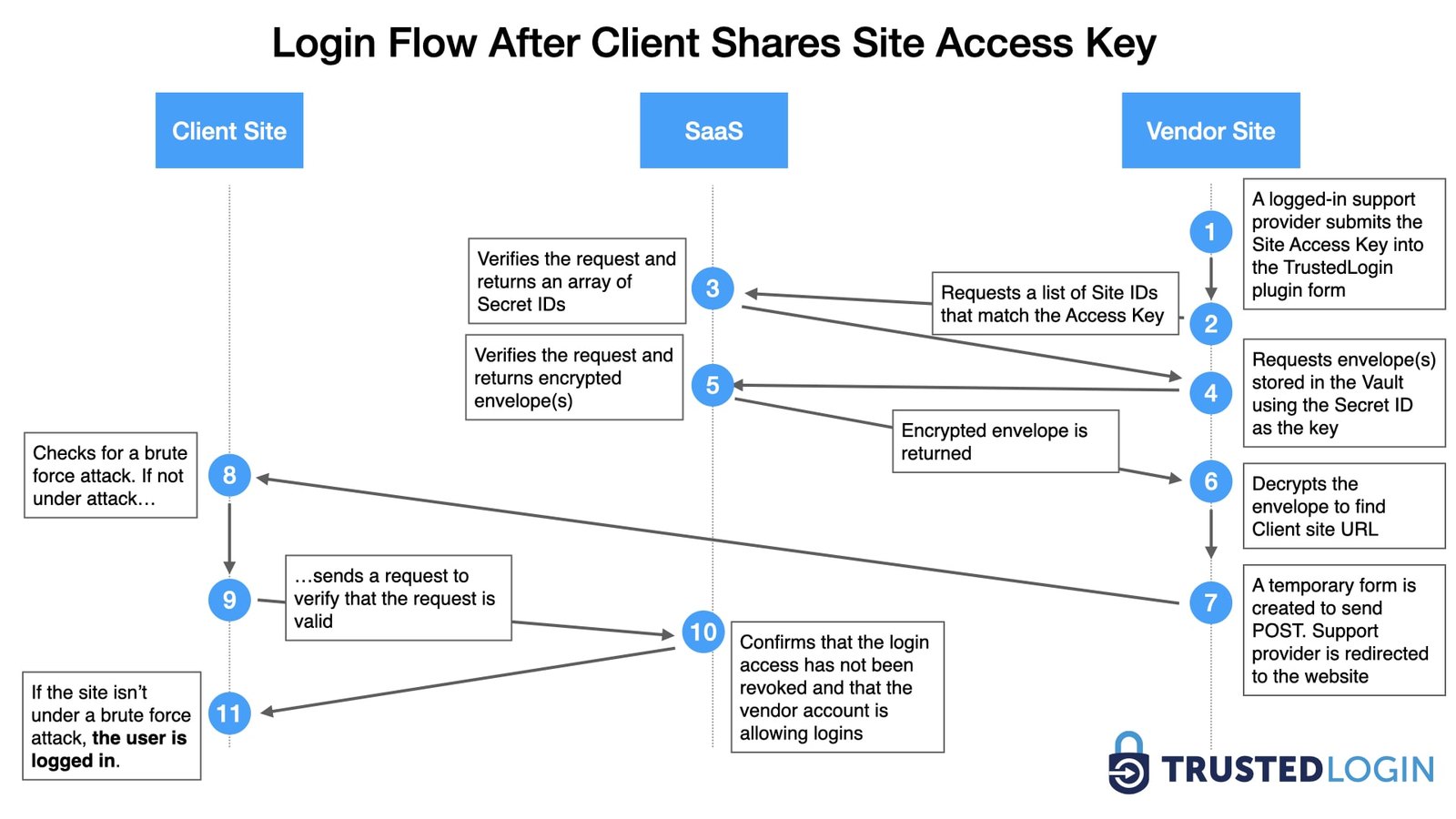
The decryption key is a long-term keypair generated and held on your own site by the Connector plugin, reused across grants until you rotate it. When your authenticated support agent logs in, the Connector decrypts the grant locally and the customer’s site verifies the result; nothing decrypts on TrustedLogin’s servers at any point. The full technical writeup, including the message schema and exactly what’s stored where, is at docs.trustedlogin.com/security. The same flow is diagrammed beside this, step by step; the rest of the flows are at docs.trustedlogin.com/flows.
Secrets
A secret is a password, an API key, or anything else that has to move between you and a customer, in either direction, and it works differently from an access grant: it never touches our servers at all. Each one is created, encrypted, and stored entirely on your own WordPress site, inside the Connector. The decryption key lives only in the link’s URL fragment; your site stores ciphertext and a one-way hash of that key, nothing that opens it. Single-view secrets are destroyed on first read; reusable ones live until an expiry you set, up to 30 days. Every secret leaves a record on your own site: created, viewed, from where, kept 90 days.
If TrustedLogin is unreachable
A grant already issued doesn’t depend on TrustedLogin staying up. It’s a real WordPress account on the customer’s own site, with its own expiry, independent of whether our service is reachable when your agent tries to log in. If our service itself is down, the Grant button in your plugin falls back to pointing the customer at your own support page instead of erroring out.
If TrustedLogin goes away
The SDK is open source on GitHub, and the Connector is GPL-licensed with its source shipped through WordPress.org. If TrustedLogin the company stopped operating tomorrow, the code embedded in your product and the plugin installed on your site don’t stop working. You’d lose the hosted dashboard and the cross-site audit log. Your own grant flow would keep running, because none of it depends on a proprietary client you don’t have the source to. And because every grant is a real account the customer’s site created, the customer or their host can always revoke it directly in wp-admin, with or without us.
Reporting a vulnerability
Found something? Email security@trustedlogin.com with what you found, where, and how to reproduce it. A proof of concept helps; a screenshot of a scanner result usually doesn’t. Prefer not to email it? The Connector runs a Patchstack vulnerability disclosure program, which is where WordPress security researchers already work, or you can open a private report on GitHub or start from security.txt.
What happens next: a person reads it, and we’ll confirm we received it. If it’s a real finding we tell you what we’re doing about it and when it’s fixed. If we think it isn’t, we tell you why rather than going quiet.
Verify it yourself
This page is the plain-language version. The engineering version, key formats, message schemas, what’s logged where, and how to run a Connector setup behind a reverse proxy, is at docs.trustedlogin.com, maintained in the open at github.com/trustedlogin/docs.